
Table of Contents
Swift Navigation / Carnegie Robotics Duro

Developed jointly by Swift Navigation and Carnegie Robotics and released in 2018, then was bought by Carnegie Robotics in fall 2024,
Duro™ is a ruggedized, high-performance and low-cost GNSS receiver with Real Time Kinematics (RTK) technology for a centimeter-level positioning accuracy. GNSS multi-band and multi-constellation support enable Duro to offer fast RTK convergence times and high position availability.
Duro uses the Piski Multi multi-band, multi-constellation GNSS receiver in a ruggedized enclosure. This page will contain information about both the Duro and Piksi Multi - as far as I can tell, there is little inherently unique about the Duro compared to the Piksi Multi mounted on the evaluation board that Swift Navigation also sold it on.
A variant of the Duro, called “Duro Inertial” also exists. As far as I have been able to determine, the hardware is identical, but it has additional software that enables the IMU to be used for inertial navigation in the event of GNSS loss.
Specs
Because the Duro uses the Piksi Multi internally, these specs are those of the Piksi Multi. The Duro has capable DC-DC power supplies on-board and runs off 10-35v DC, consuming 5-6w. Additionally, it can supply 0.25A of 5v and 1A of 12v on its serial and aux connectors, for powering external devices.
All of this is laid out in the HW Spec PDF, but at a high level:
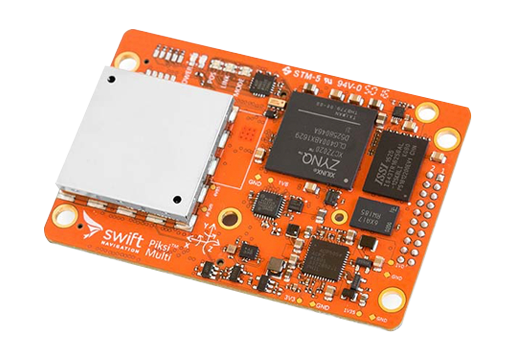
- Based on the Zync 7020 running custom cores and linux
- Dual band RTK, up to 10Hz
- GPS L1/L2
- GLONASS G1/G2
- BeiDou B1/B2
- Galileo E1/E5b
- Raw measurements at 20Hz
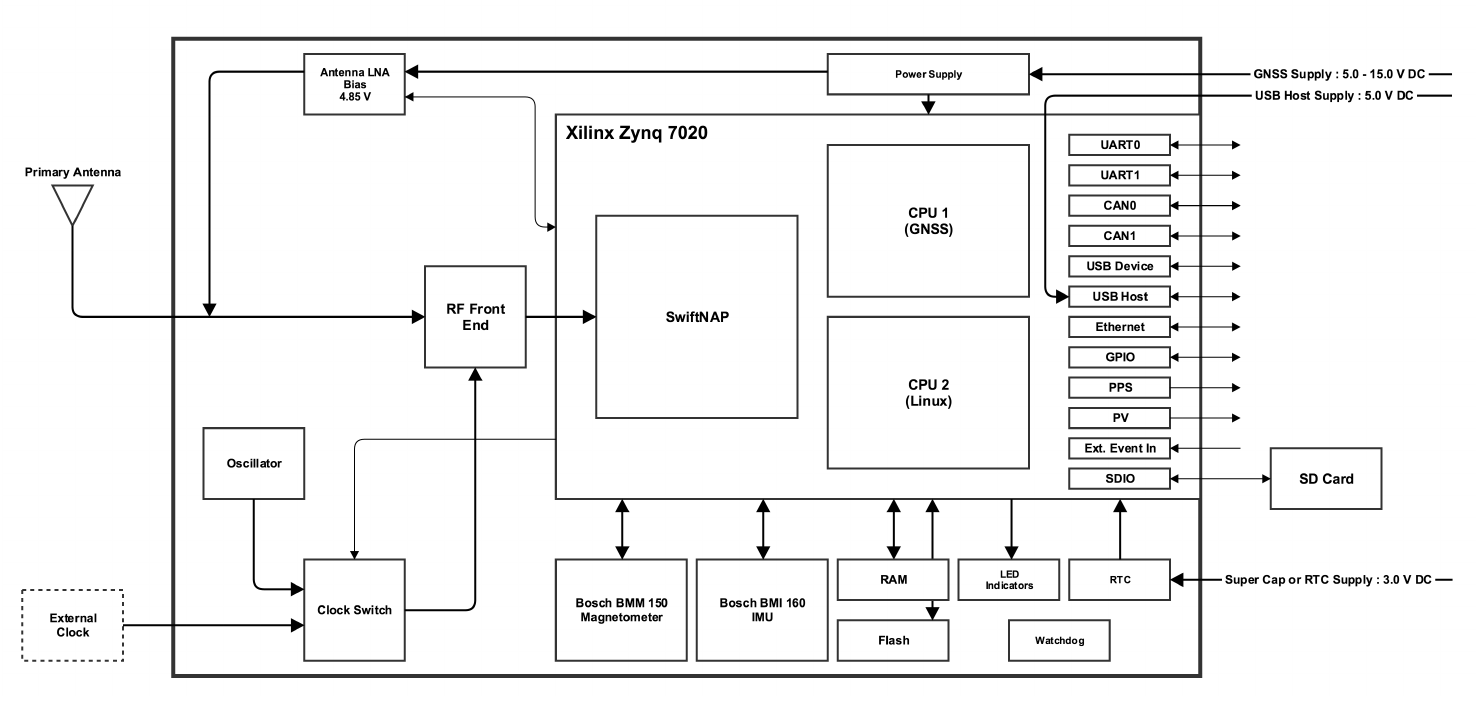
- On-board IMU (Bosch BMI160) and magnetometer (Bosch BMM150) accessible through binary data stream
- I/O
- UART, Ethernet, CAN, USB
- Communication Protocols
- SBP, NMEA, RTCM
- Software-switchable antenna bias power, 4.85v at up to 100mA
Satellite tracking and acquisition, as well as the calculation of PVT solutions, are handled entirely by the Zynq 7020. A program in the Zynq, which Swift Navigation calls “SwiftNAP”, receives the digitized RF and passes it directly to other software on the device.
Piksi Multi employs a unique design, which does not utilize an ASIC. Instead, the tracking and correlation duties are serviced by the programmable logic of the Zynq 7020. This allows Piksi Multi to be extremely flexible with regards to how tracking and correlation resources are allocated; it also makes comparisons of tracking channel count largely irrelevant.
Piksi Multi is capable of simultaneous tracking of L1 and L2 signals from up to 22 satellites. Piksi Multi HW Specification v2.2, p.2
Connectivity
Like just about every other commercial GNSS receiver, especially rugged ones, the Duro uses unique connectors for power, serial, ethernet, etc. Unfortunately un-casing the unit does not readily provide access to these signals internally, so using the connectors as intended is the best course of action for working with the Duro.
The connectors used are standard M12, which are slightly more available than LEMO or Fischer, and the user manual documents them well, if you choose to make your own cables. Behind an access panel there is a microSD slot and MicroUSB port. Using these is not sanctioned by Swift Navigation or Carnegie Robotics and will ruin the device's IP rating.
MicroUSB
There is a MicroUSB port behind the service door on the rear of the unit, and this actually gives us pretty much everything needed to get started and use the device. Officially, we are not allowed to use it.

If this MicroUSB port is plugged into another machine, it will enumerate as three virtual TTYs using the common device class abstract control module. On linux this will be ttyACM0, ttyACM1, and ttyACM2, if no other cdc_acms are present. ttyACM1 is mapped to ttyGS1 on the device and has a vt100 getty terminal running on it. You can connect to it with minicom or putty and log in as root (no password) and be greeted with some wonderful ASCII art.
In Linux on the device, ttyGS0 and ttyGS2 are symlinked to tty.usb0 and tty.usb2, respectively. tty.usb0 is available as I/O for the GNSS software, and can be used the same as the two UARTs which are physically available as the serial ports accessible through the M12 connectors on the front of the unit. By default, the GNSS firmware uses usb0 as SBP in/out, but it can be used for NMEA out, RTCM in, or RTCM out as well. ttyGS2/tty.usb2 is in use, but I don't believe its use is configurable from the Swift Console.
Note about this port: it does deliver power to the Piksi Multi, but I'm not sure if the rest of the Duro will work correctly. Usually in cases like this the Vcc line of the USB port is left disconnected, requiring the user to operate the device from a dedicated supply. I don't know if this was intentional or a mistake made when designing the Duro board. In my own testing, the Duro does work when powered from MicroUSB alone, pulling just shy of 5w in normal use. Ethernet and microSD work, I have not tested the RS-232 interfaces. I don't see any warnings or complaints in the logs, and performance appears unchanged.
microSD
In addition to the Micro USB port, there is a microSD + SIM slot under the rear cover. It is quite challenging to insert a card from this port alone, because the slot doesn't have the usual guide rails - fine tipped tweezers will be required. It is much easier if you remove the bottom panel first. The SIM slot is likely connected to the miniPCIe slot, used by miniPCIe WWAN cards.
- The microSD card cannot be used to install firmware from at boot time, only a flash drive connected to the USB host port can do that (per the documentation, I haven't yet tested this.)
- At boot, the SDHCI driver is loader and if a card is detected it is enumerated as
mmcblk0p1it is mounted at/media/mmcblk0p1(unless it was booted from, per/etc/init.d/storage_media.sh- a possible hint that u-boot can be told to boot from the SD card?) FAT, F2FS, NTFS, and ext3/4 are supported. The storage media script only includes detection routines for F2FS and NTFS, but I confirmed that ext4 works fine, and Swift Console mentions FAT in a few places as an option.
- An ext4 formatted card can be used for system logs, but the SBP logging routine only runs if the card is F2FS, NTFS, or FAT. I chose to format mine as F2FS by enabling standalone logging and choosing F2FS as the FS type. The card is formatted upon reboot by the
migrate_storage_media.shinit script.
Use
Static
For initial testing, I connected the Duro to the same antenna (an HXCSX627A mounted statically above the roof line) as the Leica GRX1200 GG Pro, and logged the same four hour period of time on both devices, then and sent them to CSRS PPP for “rapid” post processing. The results are very good, essentially identical, which suggests to me that both devices are effectively at their maximum. I'd love to compare the Duro to a newer CORS receiver like a Leica GR30 or Trimble NetR9. Perhaps one day!
I'm continuing to log raw data with the Duro and once final orbits are ready I'll do some more processing.
Kinematic
WIP
Documents and Files
All of these are currently readily available on the public web, these copies are provided as backups.
Notes and Curiosities
Provided in no particular order, the below are bits and pieces I have discovered when researching or using the Duro/Piksi Multi, that I may want to refer back to in the future, or that others may find interesting.
- Based on photos from ebay and mentions in documentation, there seem to be quite a few model numbers and revisions of the Duro. 00862-04, 00862-03, 00862-002, 00862-01, 00728-01, 00522-01 (Duro Inertials may be 00759-01 and 00759-02, but I have seen them marked 00862-02 as well).
- An August 2020 capture of the Duro specification page states “Duro contains 32 GB on-board storage for data logging which is not yet supported but planned to be released with a future firmware release.” but it's not clear if this ever happened. The latest revision of the Duro User Manual (4.4) which has Carnegie Robotics branding, clearly states “Warranty is voided if Duro back access panel is opened.”
- A number of “typical” GNSS features were on the road map, but never implemented - hot starts, warm starts, and RTC backup with an external battery or supercap. Essentially, every boot is a cold-start, though I suspect it saves almanacs and ephmerides and will use them if they are valid, after a restart.
 Photo credit Swift Navigation
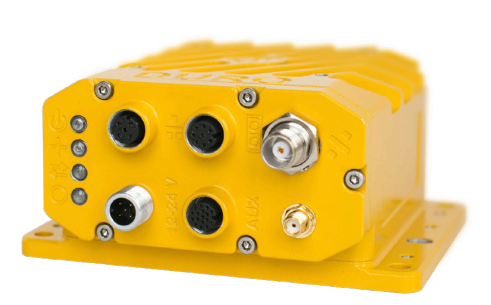
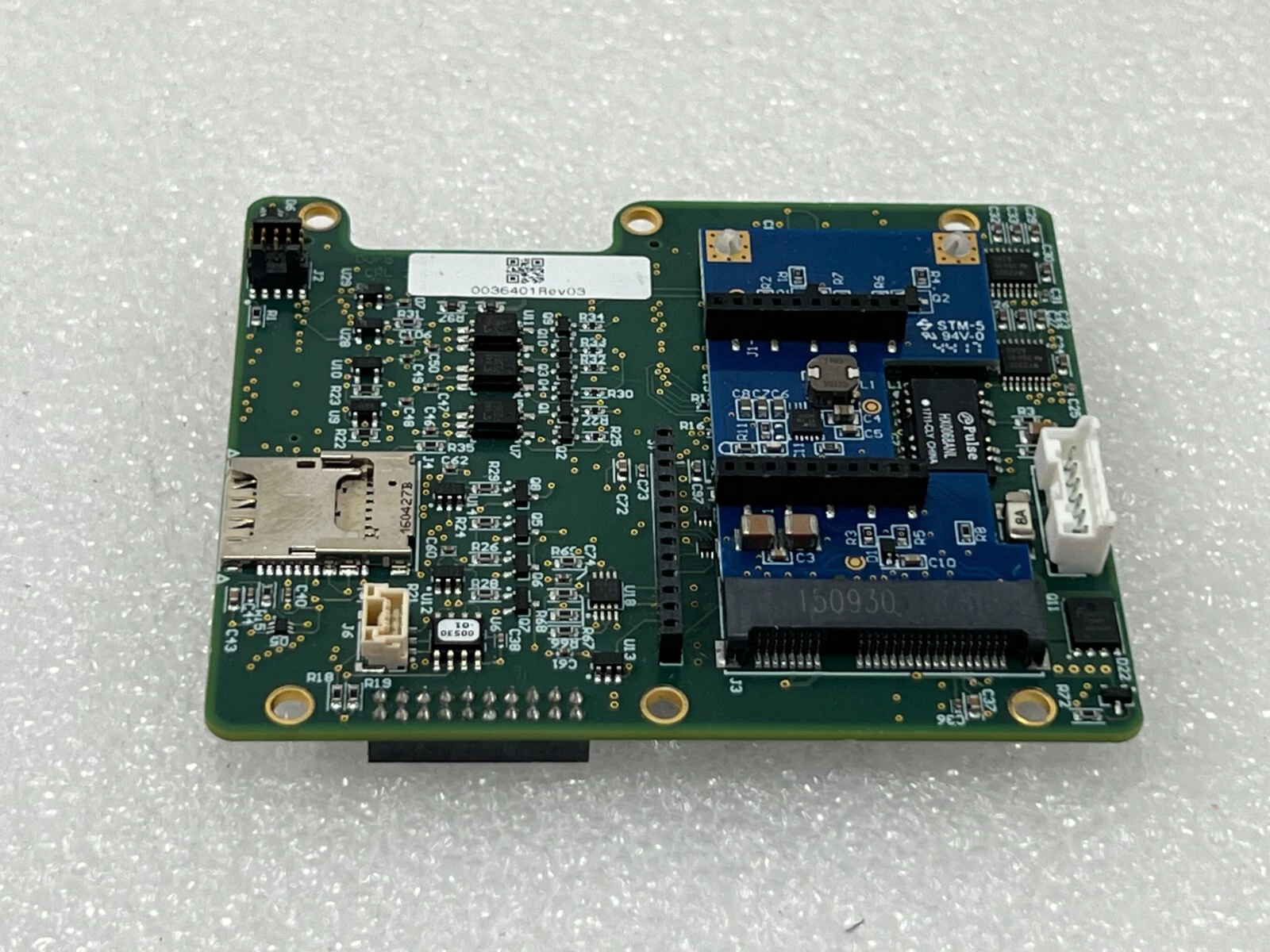
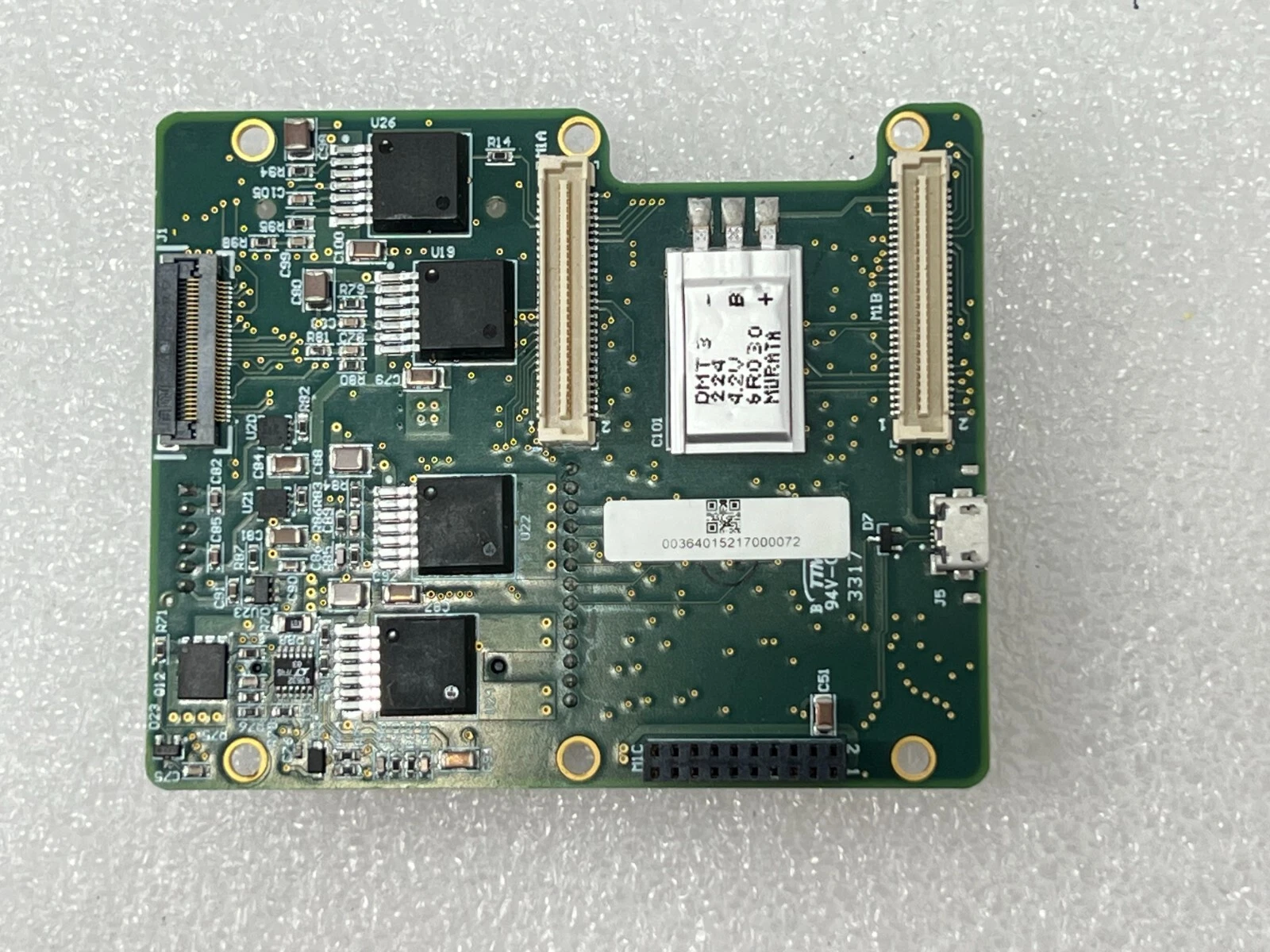
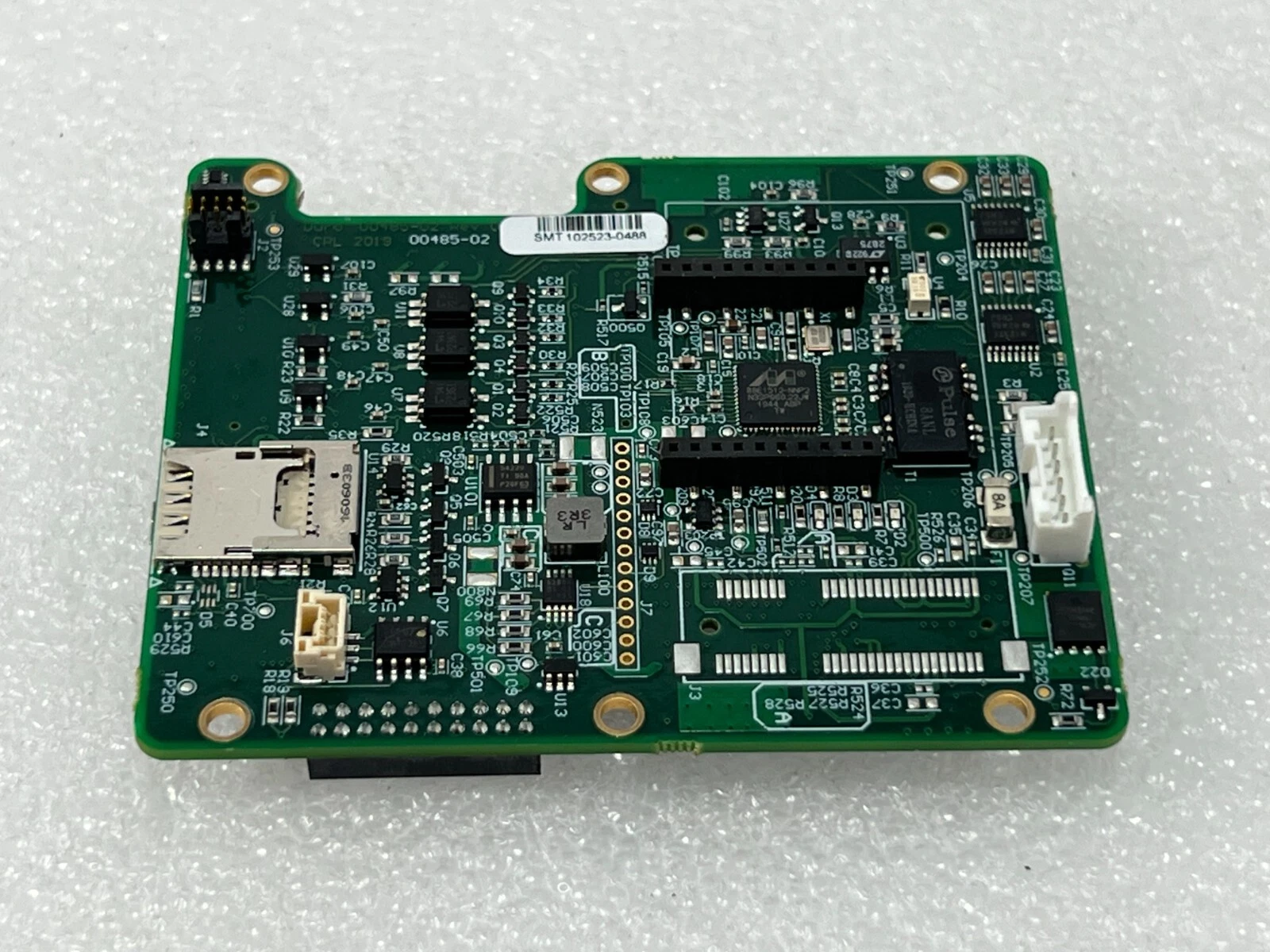
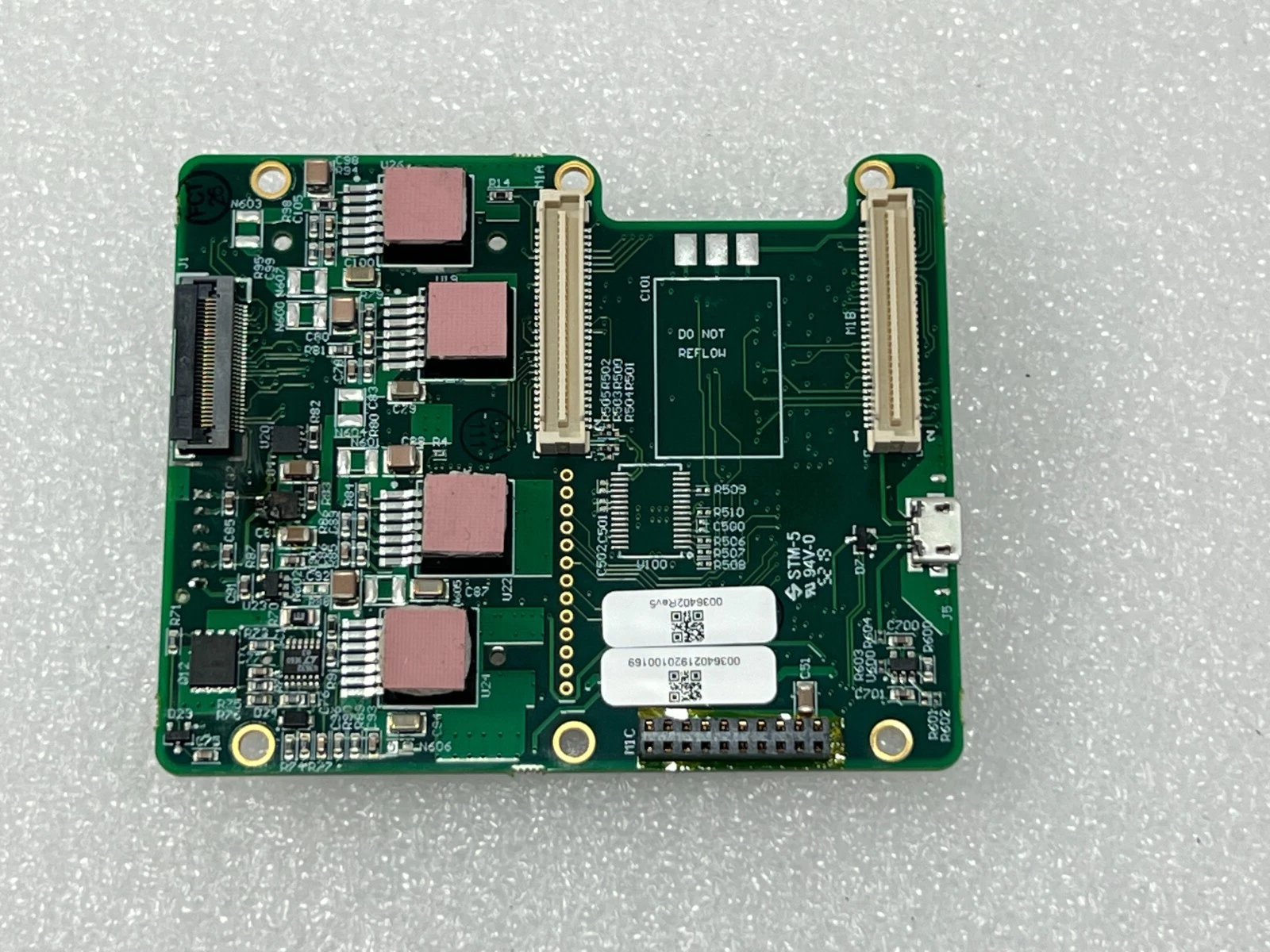
- The Duro carrier board has two 10 pin headers arranged in what appears to be the appropriate footprint for an XBee module, and there is space inside the enclosure for one. The microSD slot is also shared with a SIM slot. In early documentation there are photos of the Duro with an SMA connector next to the TNC connector - presumably there were plans to give the Duro its own connectivity, but they were abandoned. The product summary document from March 2018 describes the cellular modem as a beta feature.
- There are at least two variants of the Duro carrier board, 0036402Rev5 and 0036401Rev03. The 02 board is what is in my unit, and seems to be the newer board. The 01 board has 2017 datecodes, and the XBee headers are mounted on a custom mini-PCIe card. The 02 has the footprint for this mini-PCIe card, but it is not populated. The 01 board also has a small LiPo pack mounted, the 02 again does not have it installed, but has the footprint.
- 0036401Rev03
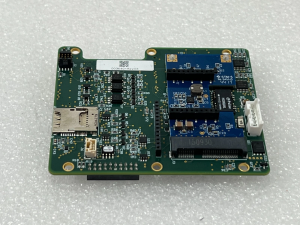
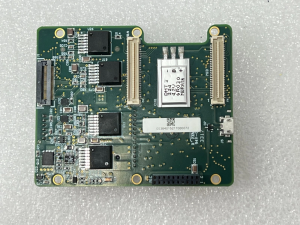
- 0036402Rev05
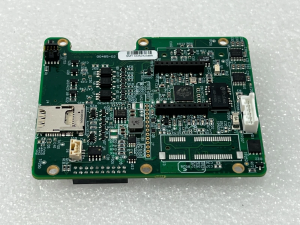
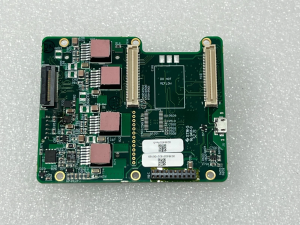
- The OS running on the Piksi Multi/Duro includes a lightweight Linux (kernel 4.x) built with buildroot. SSH is enabled by default, and there is no password for the root account. The Micro USB port also has a This environment is very tinker-friendly, and many standard tools are included. The microSD card is auto-mounted upon insertion at
/media/mmcblk0p1if formatted NTFS, F2FS, FAT, or ext3/4.
00862023922100185
Here are some notes and observations specific to my experience with the Duro I received in March 2026.
- My unit arrived in a non-default condition (in more ways than one). The IP address assigned was not 192.168.0.222/24, and UART1 was not configured to receive SBP commands from Swift Console. The microUSB port (which enumerates three ttyACM# devices on a linux host) does have SBP read/write access to the duro on ttyACM0, so I was able to access it and reconfigure it.
- In addition to running a non-default configuration, this unit also was configured with a firmware not built by Swift Navigation. The firmware version and build ID are both “Unicontrol3D_482”, and was built in 2023-02-03, just a couple of months before the final version released (3.0.17), but so far I have not been able to get the latest vanilla firmware installed - the Swift Console does not recognize the existing image and will not overwrite it.
- Most of the changes to this firmware image seem to revolve around the addition of telemetry services. There are remote support tools as well, for exporting logs and metrics, and possibly for allowing external users to connect, but I don't know if these are from Swift or Unicontrol.
- There is also a machine identifier file with some calibration data, which is kind of neat to see. This unit seems to have last been used in an excavator with a few different bucket types. You can take a look at that configuration file here: machine.yml from 00862023922100185 More about the program that uses this config file farther down.
Unicontrol Init Scripts
This gets its own block, and if any hobbyist out there gets one of these Unicontrol Duros and wants to do anything with it, they're going to go down the same path. I quickly discovered logs filling up with CAN bus errors, but it wasn't clear to me how to get rid of them. After some time looking at the init system, it became clear that Unicontrol firmware modifications largely exist as clearly-marked init scripts, and are easily disabled.
root@piksi:/persistent # ls -l /etc/init.d/S99unicontrol*
-rwxr-xr-x    1 root     root           524 Mar 20  2022 /etc/init.d/S99unicontrol_0_customization
-rwxr-xr-x    1 root     root           143 Mar 20  2022 /etc/init.d/S99unicontrol_1_remote_support_setup
-rwxr-xr-x    1 root     root           116 Mar 20  2022 /etc/init.d/S99unicontrol_2_stats
-rwxr-xr-x    1 root     root           140 Mar 21  2022 /etc/init.d/S99unicontrol_3_config_upgrader
-rwxr-xr-x    1 root     root           122 Mar 21  2022 /etc/init.d/S99unicontrol_4_can_setup
-rwxr-xr-x    1 root     root           200 Mar 21  2022 /etc/init.d/S99unicontrol_5_machine
-rwxr-xr-x    1 root     root           143 May 24  2022 /etc/init.d/S99unicontrol_6_support_tunnel
S99unicontrol_4_can_setup is right there - and really all it does is call /var/can-setup/can-setup.sh - can we stop it?
#!/bin/sh
#
# Start the can1 network
#

#Default configuration
DO_NOT_START=
CAN_BITRATE=250000
CAN_RESTART_MS=100

#Check customization file
if [ -f /persistent/customization.config ]; then
        source /persistent/customization.config
fi

#Skip auto-starting
if [ "$DO_NOT_START" -eq "1" ]; then
   echo "DO_NOT_START: can";
   exit 0
fi

#Start the network
echo "Starting canbus error reporter"
/var/can-setup/log_can_startup_errors.sh &

if [ -z "$CAN_RESTART_MS" ]; then
        echo "Starting can1 network: "
        /sbin/ip link set can1 type can bitrate $CAN_BITRATE
else
        echo "Starting can1 network (restart param $CAN_RESTART_MS): "
        /sbin/ip link set can1 type can bitrate $CAN_BITRATE restart-ms $CAN_RESTART_MS
fi
/sbin/ip link set can1 up
It looks like we can, and fairly easily! It sources customization.config and checks the status of DO_NOT_START. That config file resides in the very small, but aptly named and persistent, /persistent/ directory. I didn't want to simply set this to 1 and potentially break a bunch of things, so I scanned through the entire file system to see what else checked a DO_NOT_START variable, and was please to find that it's only Unicontrol stuff that I am comfortable disabling:
$ grep -rnw / -e '"$DO_NOT_START" -eq "1"'
./var/can-setup/can-setup.sh:17:if [ "$DO_NOT_START" -eq "1" ]; then
./var/machine/run_machine.sh:16:if [ "$DO_NOT_START" -eq "1" ]; then
./var/remote_support/remote_support_setup.sh:19:if [ "$DO_NOT_START" -eq "1" ]; then
customization.config also has a variable DO_NOT_START_REMOTE_SUPPORT, which is only checked by the remote_support_setup.sh script, which will exit if either of those variables is true.
In addition to remote support and canbus configuration, the run_machine.sh script also checks these variables. machine appears to be the program that configures the Duro for the specific piece of equipment it is installed on - in this case of this unit, an excavator. This is great, because I don't want any of those components running - especially machine - it consumes the lion's share of available RAM and quite a few CPU cycles, and the remote support stuff makes constant API calls with a token that is no longer valid.
I quickly learned that it is not as simple as setting those variables to true, because before they are read the Unicontrol init scripts actually overwrite customization.config with a bare-bones copy stored in /var/customization/. After that, the aptly named “config upgrader” init script is supposed to phone home and grab the latest version of the config file and machine definition file. All of this makes sense in the context of how this thing was deployed, but it's just a big headache for me. Honestly, this is a great template for embedded systems design in general, as far as I can tell the developers who built this did a really good job, and reverse engineering it has been a fun task.
Thankfully, and somewhat ironically, Unicontrol's custom init scripts actually save us here. The first one that is called after the rest of the system boots is S99unicontrol_0_customization and it does three things: it checks to see if customization.config exists in the persistent directory, then it checks to see if that config file has CUSTOM_SCRIPT defined, and if it does, it runs that script.
So what we can do is use this script to stop or remove the other init scripts before they wipe out my own locally created configuration file. Since the customization script runs first, this gives us an easy pathway - I simply created a script in the persistent directory called init_override.sh which removes the other S99unicontrol init scripts. I could have only removed the one that deletes my config file, but seeing as I am not using any of them, they can all go.
#!/bin/sh

rm -f /etc/init.d/S99unicontrol_1_remote_support_setup
rm -f /etc/init.d/S99unicontrol_2_stats
rm -f /etc/init.d/S99unicontrol_3_config_upgrader
rm -f /etc/init.d/S99unicontrol_4_can_setup
rm -f /etc/init.d/S99unicontrol_5_machine
rm -f /etc/init.d/S99unicontrol_6_support_tunnel
It is then referenced in customization.config as CUSTOM_SCRIPT=/persistent/init_override.sh and we reboot the system. When it unpacks the linux image into RAM and works its way through the init scripts it will hit S99unicontrol_0_customization which will find the override script (not yet deleted from the persistent storage!) and poof all of the other Unicontrol stuff is gone, there are a couple of vanilla init scripts that run afterwards, and then the unit is operating as normal, with a mostly vanilla configuration.
If we ever want that stuff to run again, all we have to do is comment out the CUSTOM_SCRIPT line in the config file, reboot again, and all those intit scripts will run again - but make sure the config file is backed up (or duplicated under another name in /persistent/) because of course it will be deleted.
Photos
My Duro is a late model, with Carnegie Robotics branding. It is not clear to me when it was manufactured, but the Marvell PHY on the carrier board has a late 2021 date code. The Piksi Multi seems to be an 00108-09 revision, but I haven't confirmed its date of manufacture yet.
Note that the Verbatim microSD card was not included in the unit, I placed it in the slot to demonstrate how it fits.
Also, I have not yet removed the Piksi Multi itself from the Duro enclosure, which is why I don't have a photo of the top of it. It is mounted with 4.5mm standoffs, and I only have nut drivers in 4 and 5mm, go figure. While I could remove them via other means, I see no need to at the moment - and the unit is thermally bonded with the enclosure, something I'd rather not disrupt. When I get my hands on a Piksi Multi Evaluation Board, I probably will pull it.


